


Meta shipped its own terminal coding agent, Muse Code, in beta on August 5, 2026, as a direct answer to Claude Code and OpenAI’s Codex CLI. Luckily, you don’t actually have to install Meta’s muse binary to use Meta’s models because Claude Code’s API layer is configurable via environment variables; you can point the Claude Code CLI you already know at Meta’s Muse endpoint and keep your existing workflow, keybindings, and muscle memory intact.
This blog covers what Muse Code actually is, what it costs, and how to wire its Contributor-tier model into a stock Claude Code install.
What is Muse Code?
Muse Code is Meta’s terminal-based coding agent: a TUI for interactive development plus a headless exec mode for CI, built around Meta’s own code-focused model family, Muse Spark. It reads a codebase, plans and executes multi-file changes, runs commands, and iterates on failures, the same shape as Claude Code and Codex CLI. It launched with persistent background subagents and a replay-exact event log for crash recovery, and Meta has since added inter-session messaging and a TypeScript SDK for building custom agents on top of it.
On raw benchmark quality, most third-party comparisons place Muse Code below Claude Code but ahead of Codex CLI. Meta isn’t claiming the smartest model; it’s claiming the cheapest capable one.
Model types
The model family is Muse Spark, currently on version 1.3, and it ships in two pricing tiers that are otherwise the same underlying model:
Standard: full data privacy; Meta does not use your prompts or completions for training, so they claim.
Contributor: a steep discount in exchange for letting Meta use your prompts and completions to improve its products.
You select the tier by model ID (muse-spark-1.3 vs muse-spark-1.3-contributor), making it trivially easy for a quick setup and swapping models when needed.
Costs
Pricing is a straight pass-through of token costs, no separate license fee:

That’s roughly a 12x discount on input and a 21x discount on output. The catch, beyond the training-data trade, is throughput: Contributor is rate-limited well below Standard, so a team running heavy concurrent agent sessions may hit throttling on Contributor before they hit it on Standard. If you’re budgeting, model cost per accepted task rather than cost per token; Muse Spark has been reported to burn more tokens per task than Claude Code on equivalent work, which eats into the headline discount.
Why the Contributor model, and when it isn’t the right call
Contributor is the tier worth using day-to-day: for personal projects, open-source work, learning, or anything you’re not contractually obligated to keep private, a ~20x cost cut is hard to argue with, and Muse Spark at Contributor pricing is cheap enough to leave running in the background on exploratory tasks you’d never justify spending Opus-tier tokens on.
Where it stops being the right call is exactly where “Meta trains on this” becomes a problem: client code under NDA, anything with proprietary business logic, credentials or secrets in context, or a repository your employer would object to leaving the building. The switch is one config string, so if this matters to your team, it’s worth pinning the model ID centrally and treating any change to it as a reviewable event rather than something anyone can flip locally.
Setting up Muse Code inside your existing Claude Code CLI
Rather than installing a second CLI, you can route your regular claude command at Meta’s endpoint using the same environment-variable mechanism. Claude Code uses for enterprise gateways, Bedrock, and Vertex:
export MODEL_API_KEY="<your-meta-model-api-key>"
export ANTHROPIC_BASE_URL="https://api.meta.ai"
export ANTHROPIC_AUTH_TOKEN="$MODEL_API_KEY"
export ANTHROPIC_MODEL="muse-spark-1.3-contributor"
export ANTHROPIC_DEFAULT_OPUS_MODEL="muse-spark-1.3-contributor"
export ANTHROPIC_DEFAULT_SONNET_MODEL="muse-spark-1.3-contributor"
export ANTHROPIC_DEFAULT_HAIKU_MODEL="muse-spark-1.3-contributor"
export CLAUDE_CODE_SUBAGENT_MODEL="muse-spark-1.3-contributor"
Get MODEL_API_KEY from your Meta Model API account, not from the muse CLI’s own OAuth login; the two auth paths are separate. Once these are exported, claude in any project directory, it talks to Muse Spark instead of Anthropic’s models while keeping every bit of Claude Code’s interface, skills, slash commands, and MCP tooling.
The four ANTHROPIC_DEFAULT_*_MODEL variables matter because Claude Code internally maps its own “which model handles this” logic (plan mode vs. execution, subagents, background tasks) to the Opus/Sonnet/Haiku tiers. Pointing all three at the same Muse Spark ID keeps that routing from silently falling back to an Anthropic model you don’t have credentials for.
The context window gotcha and the [1m] workaround
Claude Code determines a model’s context window and auto-compaction threshold from an internal table of known Anthropic model names. If you point it at a model ID, it doesn’t recognize it, like muse-spark-1.3-contributor, and instead of erring out, it silently defaults the auto-compact window to 1 token. The result: you type a single word and immediately get the context limit reached, because the CLI is now measuring your session against a 1-token budget instead of the model’s real window.
If you run /context all, you’ll see a compaction window that reads 1 token (default for an unrecognized model), with normal-looking usage numbers (system prompt, tools, skills) suddenly reported as usage percentages in the hundreds of thousands.
Muse Spark 1.3 Contributor actually has a native ~1,048,576-token (1M) context window, larger than Claude’s default 200K assumption. The fix is the same suffix Claude Code uses to opt Anthropic’s own 1M-capable models into their extended window:
export ANTHROPIC_MODEL="muse-spark-1.3-contributor[1m]"Appending [1m] tells Claude Code to treat the model as having a 1-million-token window and to add the context-1m behavior it normally reserves for Sonnet/Opus 1M variants, instead of falling back to the broken 1-token default. Officially, this suffix is documented only for known Anthropic model names, using it against a custom model ID is a workaround, not a supported path, so treat it as something to verify with /context after every Claude Code update rather than a guarantee. If a future release changes how unrecognized models are handled, this could stop working (or start working differently) without notice.
Two more MCP-related notes worth checking after switching endpoints:
Confirm your MCP tools still show as
(loaded on-demand)in/context allrather than fully materialized. Some custom-gateway setups lose Claude Code’s deferred tool-schema loading, which inflates baseline context usage significantly. If you see full tool definitions listed as loaded rather than on-demand, that’s worth investigating separately from the[1m]fix above.ENABLE_TOOL_SEARCH="true"is worth setting alongside the above if your Claude Code build supports it, but verify it’s actually being honored for your endpoint; an unrecognized or ignored flag will silently do nothing rather than error.
Quick reference
# ~/.bashrc or a project-local .env
export MODEL_API_KEY="<your-meta-model-api-key>"
export ANTHROPIC_BASE_URL="https://api.meta.ai"
export ANTHROPIC_AUTH_TOKEN="$MODEL_API_KEY"
export ANTHROPIC_MODEL="muse-spark-1.3-contributor[1m]"
export ANTHROPIC_DEFAULT_OPUS_MODEL="muse-spark-1.3-contributor[1m]"
export ANTHROPIC_DEFAULT_SONNET_MODEL="muse-spark-1.3-contributor[1m]"
export ANTHROPIC_DEFAULT_HAIKU_MODEL="muse-spark-1.3-contributor[1m]"
export CLAUDE_CODE_SUBAGENT_MODEL="muse-spark-1.3-contributor[1m]"
Then verify with claude, and immediately run /context all. If the compaction window reads a sane number instead of 1 tokens (default for an unrecognized model), you’re set up correctly.
If all is wired correctly, reload your shell and start the Claude code CLI. You should see muse-spark as the model name in use inside the Claude code.
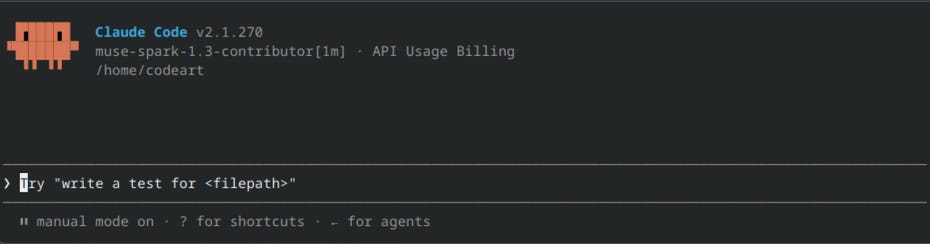
Swap -contributor out of every model ID above if you’re working with anything you wouldn’t want Meta training on; the pricing difference is real, but so is what you’re trading for it.